
How to Accept ACH and Card Payments on the Same Invoice

You can offer both on the same invoice and let your client pick. In Harpoon, every invoice can show a card option and an ACH bank transfer option side by side. Your client chooses when they click "Pay Invoice", and the payment is recorded against the invoice either way.
The reason to offer ACH is the fee. Stripe charges 2.9% + 30¢ for a card payment and 0.8% for an ACH bank transfer, capped at $5. On bigger invoices that difference adds up fast.
What Each Option Costs
These are Stripe's standard US rates. Harpoon doesn't add a transaction fee on top of either.
| Invoice amount | Paid by card | Paid by ACH | You keep extra |
|---|---|---|---|
| $500 | $14.80 | $4.00 | $10.80 |
| $2,000 | $58.30 | $5.00 | $53.30 |
| $5,000 | $145.30 | $5.00 | $140.30 |
| $10,000 | $290.30 | $5.00 | $285.30 |
Apple Pay, Google Pay and Cash App Pay cost the same as a card. Stripe's pricing page has the current rates.
Card vs. ACH: The Tradeoffs
ACH is cheaper, but it isn't better in every way.
- Speed. A card payment is confirmed right away. An ACH payment takes up to four business days to clear.
- Failed payments. An ACH payment can fail after it's submitted, for example if the account doesn't have enough money in it. Stripe charges $4 when that happens, and the invoice goes back to unpaid.
- Disputes. A client paying from a personal bank account can dispute an ACH payment for up to 60 days. Stripe charges $15 for a dispute.
- Where it works. ACH is for US clients paying from a US bank account, in US dollars, into a US-based Stripe account.
For most freelancers and agencies, the simple rule is: offer both, and let the client decide. Clients who want to pay with a card still can, and clients paying a large invoice from a business account will usually happily take the bank transfer.
How to Set It Up in Harpoon
- Connect Harpoon to Stripe. For ACH you need a US-based Stripe account.
- On your Invoice Settings screen, check both "Accept credit & debit cards" and "Accept ACH bank transfers."
- That's it. Every new invoice will offer both.
For an invoice you've already created, edit it, click "Customize", and check the payment options you want. This is also how you switch one off for a single invoice. For example, you might turn off card payments on a large invoice so the bank transfer is the only online option.
What Your Client Sees
When your client clicks "Pay Invoice", the payment page shows two tabs: "Card & Wallets" and "Bank Transfer (ACH)".
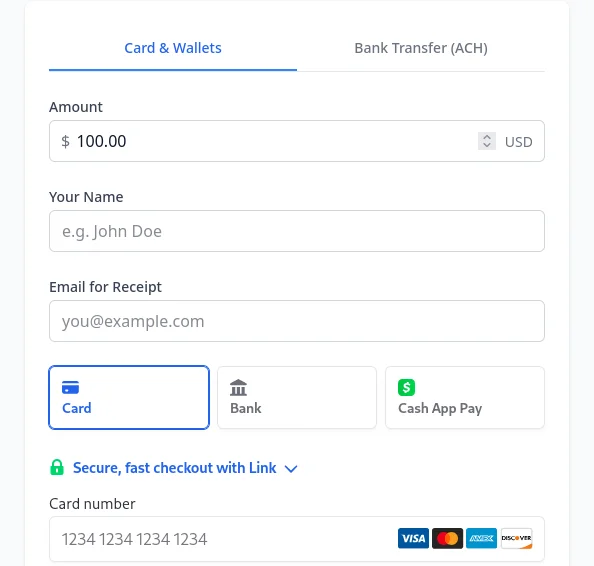
On the ACH tab, they click "Pay with Bank Account" and sign in to their bank through Stripe. There's no typing in routing and account numbers, and no waiting for test deposits in most cases. If their bank can't connect that way, Stripe falls back to entering the numbers by hand.
You don't need to print your bank details on the invoice. The client pays through the secure payment page, and the money lands in your Stripe account like any other online payment.
After Your Client Pays
While an ACH payment is clearing, the invoice shows as "Processing" in Harpoon, and your client's view of the invoice shows that their payment is on its way. Harpoon emails you to let you know a bank transfer is processing.
A processing payment isn't counted as collected revenue yet. Once it clears, the invoice moves to "Paid" and the payment counts toward your collected revenue and goals.
Recurring Invoices and Auto-Billing
ACH works with recurring invoices too. When a client pays a recurring invoice by bank transfer, they can opt in to auto-billing, and future invoices are charged to the same bank account automatically. They can update their bank account or cancel auto-billing from their copy of the invoice at any time.
Give It a Try
If you're already connected to Stripe, check that both options are turned on in your Invoice Settings, then open the client link for any unpaid invoice to see the two tabs your client will see.
Questions? Drop us a line at [email protected].