
How do I calculate the resulting hourly rate for a project?
Not sure which one you're using? The new interface has a dark sidebar and /app/ in the web address; the classic interface has a bright blue sidebar. You can switch at any time: in the new interface, click your name (top right) and choose Switch back to classic; in the classic interface, hover your avatar (bottom left) and choose Try the new Harpoon.
The hourly rate you bill isn't always what you end up earning per hour. Unbilled and non-billable time lowers it, and Fixed Fee projects aren't billed by the hour at all. That's why each project shows an Actual Rate: how much revenue your team averaged per hour on the project.
It works for Hourly and Fixed Fee projects, as long as your team tracks time. Open any project from your Projects page and you'll find Actual Rate in the bar near the top of the page.

Harpoon adds up the totals of every invoice for the project (canceled invoices aren't counted) and divides that by all the hours recorded for the project, whatever their status: billed, unbilled, non-billable or fixed.
For example, say your team recorded 10 hours on an Hourly project, and 2 of those hours were non-billable. You invoice $800 for the 8 billable hours at $100/hour. Your actual rate is $80/hour, because $800 is spread over all 10 hours your team put in.
Until the project has an invoice, the Actual Rate shows $0.00/hour. (The Classic interface hides it until then.)
Ever get to the end of a client project and wonder how much revenue you averaged per hour? Sure, there’s the hourly rate you billed your client. But your actual hourly earnings might be quite different when considering all the unbilled and/or non-billable time your team has put into the project. And what about those Fixed Fee projects that weren’t billed by the hour? Wouldn’t it be nice to know how much you averaged per hour on those projects, too?
That’s why we’ve added Actual Hourly Rate calculations to your projects in Harpoon. The actual hourly rate is a more accurate and wholistic approach to determining how much revenue your team averaged per hour on any given project. Here’s how it works:
First of all, actual hourly rate calculations work for both Hourly and Fixed Fee projects. As long as your team is tracking their time, Harpoon is able to calculate an actual hourly rate for the project.
You’ll find a project’s actual hourly rate displayed towards the top of each Project Details screen within the Details Summary bar like so:
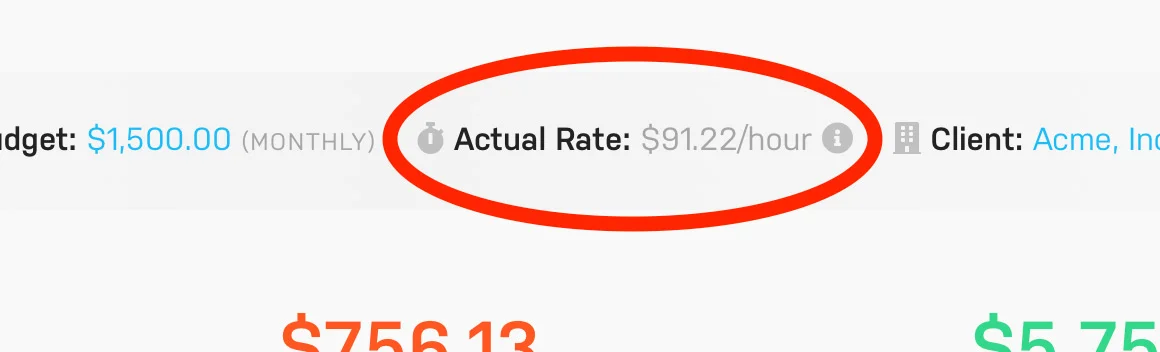
Note: The actual hourly rate won’t display until after you’ve created an invoice for the project. Until then the calculation will be hidden.
The project's actual hourly rate is based on all the recorded hours for the project (including hours with statuses of billed, unbilled, non-billable, fixed fee, etc.) combined with the totals of every invoice created for the project. The project’s invoice totals divided by its total number of hours yields the actual hourly rate.
For example, let’s say your team recorded 10 hours for an Hourly project. 2 of those hours were non-billable. You end up billing your client $800 for the project at a rate of $100/hour for 8 hours of billable work. But your actual hourly rate would be calculated at $80/hour as it takes in to account not only the 8 billable hours, but also the 2 non-billable hours your team recorded, for a total of 10 hours. $800 divided by 10 hours is $80/hour.
In summary the actual hourly rate represents the results of not only the hours you actually billed your client, but all the time your team has contributed to a project. It’s a more accurate representation of how much revenue you averaged per hour on the project.